


CleanPro
3.626.00 Reviews
App Specs
- Version
- 1.1.0
- Updated On
- License
- Free
- Downloads
- 100,000+
- Developer
- AJ IT Solutions
- Categories
- Tools
- Platform
- Android
Screenshots
 Analysis by AppCompare
Phone storage problems rarely arrive as one dramatic event. They build quietly through forgotten downloads, duplicate-looking media, oversized videos, and apps that were useful once but now sit untouched. By the time a warning appears, finding the real cause can take longer than the cleanup itself. CleanPro, a free tools app from AJ IT Solutions, is designed around that recurring nuisance: helping me inspect storage, locate large files, and bring some order to installed apps without turning the task into a hunt through unrelated settings screens.
After using it, my main impression is practical rather than flashy. Its value depends on whether I want a focused storage check and a simpler way to review what is taking up space. It is not the sort of utility I would open for entertainment or leave running as part of my daily routine. I would open it when my phone starts feeling crowded, when a download fails because space is tight, or when I need to decide which apps and files are still worth keeping. The real benefit is less time spent searching for the source of a storage problem.
How CleanPro fits into a real storage cleanup
I use this section to show how CleanPro turns a vague “my phone is full” problem into a more manageable review, while keeping the final decisions in my hands. The useful shift is to treat cleanup as a short audit: first identify what is consuming space, then decide what still serves a purpose before moving on to the next step.
Why the problem is harder than it looks
Android already includes storage information, but the built-in screens can make the next step feel scattered. One screen may show broad categories, another may handle applications, and file browsing may require a separate route. That is manageable when I know exactly what I am looking for. It is less convenient when I only know that the phone is full.
CleanPro brings its purpose into one place. The app focuses on managing storage, cleaning large files, and organizing apps, so I can begin with a general inspection and then move toward specific decisions. That distinction matters. A cleanup tool is useful when it helps me understand what can be removed, not merely when it displays a large “clean” button.
I also appreciate that the app is aimed at ordinary maintenance rather than technical users. Someone who does not want to compare folder paths or interpret storage categories can start with the most visible sources of clutter. At the same time, I would still treat every deletion suggestion carefully. A large file is not automatically an unnecessary file, and an old app may still contain information I need.
The first setup should be deliberate
My recommended first session is not a rushed cleanup. I would open the app when I have a few quiet minutes, let the storage overview guide the inspection, and begin with items whose purpose is obvious. Large videos that I have already backed up are good candidates. An abandoned download is another. Personal photos, work documents, and offline travel material deserve more caution, even when they occupy considerable space.
Worth Reading Before You Choose

EA SPORTS FC Mobile 26 Is a Bigger Football Game, but It Takes Time

Flipboard Shows What News Apps Must Do Beyond the Feed

Switching to Android Auto Means Rethinking Your Driving Routine

Google Calendar Makes a Crowded Week Easier to Manage

Ludo King Makes the Most of the Minutes Between Plans

Baby Panda World Brings Quick Play to Modern Phones, but Its Game Library Feels Busy
The current version is 1.1.0, and it supports devices running Android 7.0 or later. That gives the app a broad reach across older and newer Android phones, although the experience can still vary with the phone manufacturer and the way Android handles app and file access. I would not judge a cleanup result only by how much space appears available afterward; I would also check whether the files I meant to keep remain easy to find.
One useful habit is to separate discovery from deletion. On the first pass, I use CleanPro to identify large files and review installed apps without immediately removing anything. On the second pass, I act only on items I recognize. This two-step workflow reduces the most common cleanup mistake: deleting something simply because it looks large or old.
What I would inspect first
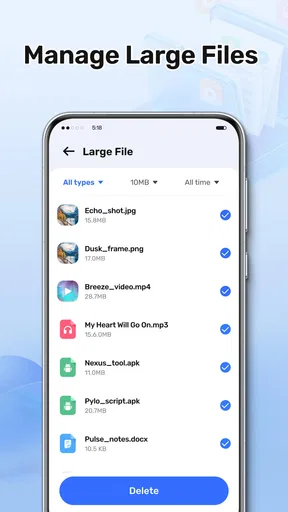
I start with large files because they often produce the quickest improvement. A single long video can matter more than dozens of small images, and large files are easier to evaluate by name, location, and recent usefulness. The app’s emphasis on large-file cleanup makes it particularly suitable for this first pass.
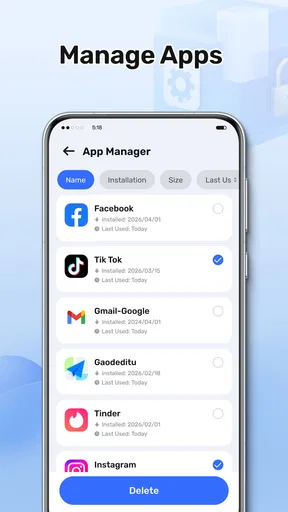
Next, I review apps that I installed for a temporary purpose. A shopping app used for one purchase, a game I stopped playing, or a utility needed for a past trip can remain installed long after its value has ended. CleanPro’s app organization angle is helpful here because it turns an unstructured application list into a deliberate keep-or-remove decision.
I would then return to the files that are less obvious. Downloads can contain manuals, images, installers, and documents that no longer matter, but they can also hold something important. The best approach is to open or identify each questionable item before removing it. This is slower than accepting every suggestion, but it is also the difference between useful maintenance and an avoidable recovery problem.
A realistic everyday scenario
Imagine I am preparing for a weekend trip and want to record video, download maps, and keep enough room for routine phone use. The device reports that storage is nearly full, but I do not know whether the cause is media, applications, or forgotten files. Instead of checking each category manually, I use CleanPro to locate the largest candidates first.
I might find an old set of videos that has already been copied elsewhere, several downloads from previous trips, and apps that I have not opened in months. The important time saving is not that the app makes the decision for me. It is that it narrows the search. I can review the biggest, most likely sources before touching smaller files that would barely change the available space.
After that cleanup, I would check the phone’s storage again and confirm that the change is meaningful. If the result is minor, I would not keep deleting randomly. I would instead reconsider whether the remaining space is tied to an app, media library, or system-managed area that requires a different tool or the phone’s own settings.
Where it removes friction
The strongest part of this app is the reduction of mental overhead. Storage maintenance usually involves three questions: what is large, what is safe to remove, and which apps are no longer useful. CleanPro addresses those questions in the same general task rather than making me jump between unrelated menus.
That is especially useful for people who do not maintain a carefully organized file system. I can understand a list of large files more quickly than I can understand a collection of nested folders. Likewise, reviewing apps as a group makes it easier to notice temporary installations that have become permanent by accident.
Another advantage is that the app gives me a reason to clean with a specific goal. Instead of vaguely trying to “make the phone faster,” I can focus on freeing enough room for a recording, an update, or a download. That makes the process more measurable from a user’s point of view, even though the app itself is not a replacement for broader device troubleshooting.
There is also a useful trade-off here. A focused utility can make discovery easier, but it cannot know the personal value of a file. Any cleanup screen that emphasizes size may tempt users to treat storage cost as the only criterion. I would use CleanPro as a sorting aid, not as an automatic authority over my files.
Who will get the most from it
CleanPro is a good match for someone whose phone gradually fills up and who wants a straightforward place to begin. It is also useful for people who frequently download media, keep many applications installed, or prefer not to navigate several Android settings pages. If you regularly move between work, travel, and personal tasks, the large-file view can help reveal leftovers from short-term projects.
It may be particularly approachable for users on older Android devices because the minimum operating system is Android 7.0. That does not guarantee identical behavior on every handset, but it means the app is not limited to the newest phones. The free price also makes it easy to try as a maintenance tool without committing money before deciding whether its workflow suits you.
The age rating is Everyone, which fits the app’s general-purpose utility role. Still, an accessible interface does not remove the need for careful judgment. A family member who is uncomfortable distinguishing personal files from disposable downloads may need guidance during the first cleanup, especially when reviewing videos and documents.
Who should choose another approach
I would look elsewhere if my main need were advanced file management, cloud synchronization, duplicate-photo analysis, or detailed control over application data. CleanPro’s purpose is narrower: storage management, large-file cleanup, and app organization. A dedicated file manager may be better when I need to rename, move, archive, or inspect folders in depth.
I would also avoid expecting it to solve every performance complaint. A phone can feel slow because of battery health, background activity, an aging processor, network conditions, or a problematic application. Removing a few large files may create breathing room, but it will not automatically fix those unrelated causes.
For users who already have a reliable personal cleanup routine, the app may not add much. If I know exactly where my downloads are, regularly uninstall unused apps, and keep media backed up, manually maintaining storage can be just as effective. The value here is convenience and visibility, not a promise that every phone needs a separate cleaner.
How it compares with Android’s usual tools
The built-in Android storage screens remain the safest starting point for users who want system-level information and direct control. They are already part of the device, and they may expose details that a third-party utility does not present in the same way. However, the experience can feel fragmented, particularly when I am trying to move from a broad warning to a shortlist of files worth reviewing.
CleanPro is more appealing when I want a dedicated cleanup session. Its narrower purpose gives the task a clearer shape: inspect storage, find large files, and review apps. The trade-off is that I am adding another layer between myself and the operating system. I would therefore use it for discovery and organization, while still paying attention to Android’s own confirmation screens and storage totals.
Compared with a full file manager, CleanPro should feel less demanding but also less comprehensive. A file manager is better for hands-on organization; this app is better when my first question is simply, “What is taking up the most room?” Compared with aggressive one-tap cleaners, I prefer a more deliberate workflow because storage cleanup is an area where speed can create mistakes.
Small habits that make the app more useful
My first tip is to begin with the largest items rather than the most numerous ones. Removing many tiny files can feel productive while barely changing available space. A short review of the biggest videos or downloads usually gives a clearer return for the time spent.
My second tip is to review apps by purpose, not only by age. An app installed recently may be disposable after a one-time task, while an older app may still be essential. I ask myself when I last used it, whether I can reinstall it easily, and whether it stores anything I need before choosing removal.
My third tip is to clean before an urgent need, not during one. If I wait until I am standing somewhere with no room to record or download, I am more likely to delete hastily. A calm review lets me identify backed-up media and obsolete downloads without pressure.
A fourth useful habit is to keep a boundary around personal archives. I do not treat every large file as clutter, and I avoid using size alone to decide what survives. CleanPro helps me find candidates; my own backup knowledge and context determine the final action.
Reliability, expectations, and everyday friction
The app’s public reception is mixed but established, with an average rating of 3.6 from around 260 ratings and more than 100 thousand installs. Those figures suggest that CleanPro has reached a meaningful group of Android users, while the rating also tells me not to expect a universally smooth experience on every device.
In practice, utility apps can feel different across manufacturers because storage permissions, system categories, and uninstall behavior are not perfectly uniform. I would judge CleanPro by whether it helps me reach a sound decision faster, rather than expecting every screen to behave identically on every phone. If a result looks surprising, I would verify it through Android’s own storage settings before taking action.
The developer is AJ IT Solutions, and the app is free to use. That lowers the barrier to testing the workflow, but it does not change my basic rule: I want clear visibility before deletion. A free tool is worthwhile when it saves time without adding uncertainty. If I find myself double-checking every result in several other places, its convenience advantage becomes smaller.
My final judgment
CleanPro succeeds when the recurring problem is disorganized storage and the immediate goal is to find the biggest, most obvious sources of clutter. I like its practical focus on large files and installed apps because those are often the areas that matter most during a rushed cleanup. It gives me a clearer starting point than wandering through settings, and its free availability makes a trial easy.
My reservation is that no storage cleaner can understand the personal importance of a file. The app can reduce searching, but it cannot replace backups, context, or a careful final review. Users looking for deep file operations, duplicate-media intelligence, or a complete device-maintenance suite may be happier with a different category of tool.
For someone who repeatedly runs out of room and wants a simple inspection workflow, I would recommend CleanPro as a useful helper rather than an automatic cleanup button. It is best used in short, intentional sessions: identify the largest candidates, check what they are, review unused apps, and confirm the result afterward. That approach captures what the app does well—saving time and reducing friction—without asking it to make decisions that belong to me.
Pros
- Quickly removes junk files and frees up storage space.
- Simple interface makes routine cleaning easy for beginners.
- Helps identify large files that are taking up valuable space.
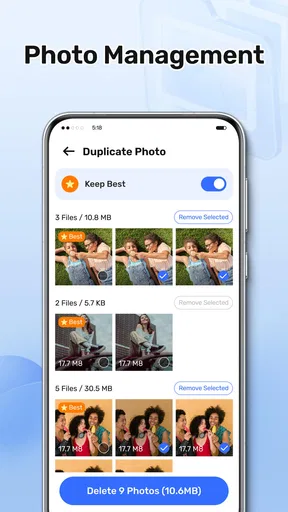
- Useful tools for managing duplicate or unnecessary media.
- Cleaning scans are generally fast on modern devices.
Cons
- Some features may require a premium subscription.
- Aggressive cleaning can remove files you intended to keep.
- Frequent ads may interrupt the free version experience.
- Results can vary depending on device and Android or iOS limits.
- Battery or memory tools may offer limited real-world benefits.
FAQs for CleanPro
What is CleanPro, and what can it do for my device?
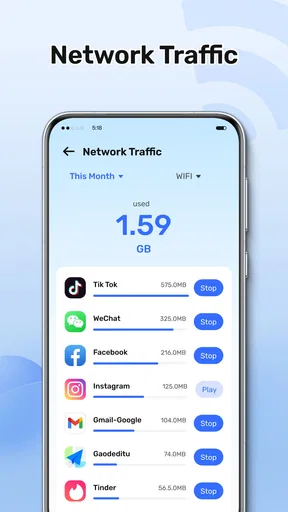
CleanPro is designed to help users maintain their Android or iOS devices by identifying unnecessary files, cached data, duplicate items, and other storage-consuming content. Depending on the version and platform, it may also offer tools for organizing photos, monitoring storage usage, improving device maintenance, or managing applications. Its usefulness depends on the permissions granted and the features available in your specific version.
Is CleanPro safe to download and use?
CleanPro should be downloaded only from the official Google Play Store or Apple App Store to reduce the risk of installing a modified or unsafe copy. Before using it, review the developer information, recent user reviews, privacy policy, and requested permissions. Cleaning applications may require access to files, photos, or storage, so users should grant only permissions they understand and feel comfortable providing.
Can CleanPro really make my phone faster?
CleanPro may help improve available storage by removing temporary files, redundant data, or unwanted media, but it cannot guarantee a dramatic performance increase. Modern Android and iOS systems already manage memory and background processes automatically. The most noticeable benefits usually come from freeing storage space, deleting large unused files, and removing applications you no longer need rather than repeatedly clearing every cache.
Does CleanPro delete personal photos, videos, or important files?
CleanPro should normally show a review screen before removing files, but users should still check every suggested item carefully. Cleaning tools can identify duplicates, screenshots, large videos, downloads, or unused files, and some recommendations may include content you want to keep. Create a backup of important photos and documents first, and avoid confirming automatic cleanup until you have verified what will be deleted.
Is CleanPro free, or does it require a subscription?
The availability of free and premium features can vary according to the platform, region, and current app version. CleanPro may provide basic scanning or cleaning tools at no cost while placing advanced functions behind in-app purchases or a recurring subscription. Before starting a trial, read the payment details, renewal conditions, and cancellation instructions carefully, because deleting the app alone may not cancel an active subscription.


